



For several months, I was sending all of my tweets to update my Facebook status using the Twitter application on Facebook. Yes it saved time, but I found this approach was annoying to many people. (Thank you to those who clued me in to my obnoxious behavior).
Because I might tweet ten or twenty times some days, my Twitter stream was too large for most of my Facebook friends. Worse, I was confusing people on Facebook when they would see a reply or a re-tweet that made no sense out of context. And for my Facebook friends who are not on Twitter, I sounded like a lunatic. Here is an example of the sort of tweet that does not belong on Facebook @jadecraven Looking forward to meeting you too. I'm at LAX now -- will be in Sydney Monday morning.
So I was excited when Michael J. Russell turned me on to a Facebook application called Selective Twitter Status. This simple applications allows you to update your Facebook status from Twitter, but you can choose which tweets you want by ending a tweet with #fb when you want to post it as your Facebook status.
Selective Twitter Status is a free application by Andy Young. Andy accepts donations and I was thrilled to send him a few bucks because I like this application so much.
Here's how to set it up.
1) Go to Facebook, search for the Selective Twitter Status application in the search bar on the right and click on it.
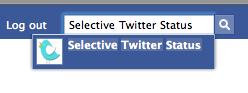
2) When you get to page, click on the application

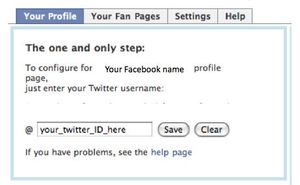
3) It is so easy to configure. It takes just one step – enter your Twitter user name. Note that if you have another Twitter status application you will need to disable it first.
4) Now, when you update Twitter, all you need to do is add #fb to the end of each tweet that you want to show on your Facebook status. Really, it's that easy. And it works in other Twitter clients like Tweetdeck and Twitpic.
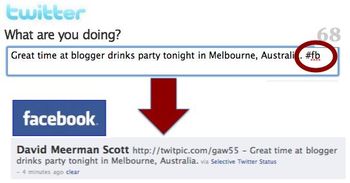
I love this application so much that I wanted to share here.
However, I am not an expert. Please direct any questions or support issues to the help page.


I love this application too. It also works when you post from one of the URL shortening services, like bit.ly . I have turned many friends on to it and have become a fan on its Facebook page.
Now if only there was a reverse one to go from Facebook to Twitter selectively.. : )
Posted by: twitter.com/terilg | September 03, 2009 at 03:39 PM
Great post! I had the same experience. Got feedback that my tweets were sometimes hard to understand in Facebook, and that I was at times sending too many status updates. Selective Twitter has addressed those issues.
Posted by: twitter.com/MikeBoehmer57 | September 03, 2009 at 03:40 PM
Thanks for the post. Much easier than checking the update boxes every time I submit a post.
Posted by: twitter.com/johnheaney | September 03, 2009 at 03:48 PM
You haven't had any feedback from Twitter followers that it's annoying to see #fb in your tweets?
It may be a little OCD of me, but I really don't like seeing the hash tag appropriated for a different function. The pound sign has become a standard for labeling metadata about your tweet and aggregating content on a particular subject.
By using the hash for something else, you're forcing your Twitter followers to ask "how is this a tweet about Facebook?" Even if they know about the Selective Twitter app, it puts the burden on your audience to understand that they're supposed to ignore that part of your tweet.
Posted by: Brent Billock | September 03, 2009 at 03:52 PM
I always seem to annoy people either way! But good point!
Posted by: Traxxas | September 03, 2009 at 03:53 PM
Brent - Yeah, but what can I say. I annoy them less now than I did before. Nothing is perfect.
Posted by: David Meerman Scott | September 03, 2009 at 04:16 PM
Sounds like a useful application, David. I was doing the same thing (and getting some similar pushback from my Facebook contacts). Now i just use the Facebook integration Tweetdeck. It allows me to manage multiple Twitter accounts and my Facebook account and select which posts go where. Simple and easy.
And I swear Tweetdeck didn't pay me to post this :)
Posted by: www.facebook.com/profile.php?id=763584622 | September 03, 2009 at 05:13 PM
David, thanks for your gracious shoutout.
I discovered the Selective Twitter Status app after much trial and error, and have found it to be a wonderfully simple and effective solution to a nagging problem. I'm glad to share what I've found with others who will find value in it, too.
So, now my long-suffering, non-Twitterphile friends and family on Facebook don't have to be subjected to incomprehensible stuff like:
RT @NormanBilly OH: Rumble in Hastings, FTW! #needcheese #SaxonFAIL
...unless they want to be, of course.
Posted by: Mrussell | September 03, 2009 at 05:48 PM
Classic helpfulness from DMS! Good stuff for your reader here, mate.
Have you taken advantage of Facebook's newish feature letting you automatically post your Page's updates to Twitter?
Similar shortcoming -- not selective -- but I suspect FB Page --> Twitter would be more palatable to your audience. Just a hunch, though.
Posted by: Scott Hepburn | September 03, 2009 at 08:23 PM
Maybe I'm not as busy as everyone else, but I like to keep my twitter and FB updates completely different/separate. I've never even considered having twitter updates appear on FB as well. Am I an anomaly? I use twitter for more business/fact-oriented tweets, and FB for more personal updates.
Posted by: Linda VandeVrede | September 03, 2009 at 11:29 PM
It's a nice functionality to have, although like Linda I tend to use Twitter more professionally and Facebook socially. If the talk of Facebook challenging Google for the real-time search space are true then Facebook will become increasingly business orientated though, which aligns nicely with the recent comScore report showing that Facebook served 8.2% of all online ads.
Posted by: Adi @ The Management Blog | September 04, 2009 at 07:18 AM
hi buddy.....ur study regarding twitter followers was really very amzing ...
Posted by: Sweton Fleming | September 04, 2009 at 08:58 AM
Hi David,
Good of you to share. I use Selective Twitter status also and have tried to turn my friends onto it. Since many people have varying audiences for Twitter and Facebook, you are right, Twitter updates make you look a little nuts to the unenlightened, not to mention clogging the newsfeed.
Also, for FB pages, I found the Twitter application from Involver to be a good solution. It will create a tab for your Twitter stream, although you have to pay a premium to have it update the fan page status. Hopefully an even cleaner solution will come out soon.
Thanks for sharing! I'm always looking for tips on new apps and technologies.
Posted by: Tamara Gruber | September 04, 2009 at 10:51 AM
Thanks! I find tweets posted to FB sometimes useful, sometimes annoying. So it's up to the tweeter to make a choice on each tweet, as you've done.
I do the same, but use Tweetdeck's FB option. For each tweet I decide whether I want it to also go to FB or not. That lets me screen out the irrelevant items.
Posted by: Russ Somers | September 04, 2009 at 10:55 AM
Thanks for sharing about this David. I haven't posted to my Facebook page from my Twitter account, but now Facebook offers the reverse with pages - you can tweet what you post to your Facebook page. I thought it would be nice, since I tweet much of what I post to my organizations page anyway, but on some of my tweets if posted a link that didn't exist on Facebook, so it seems there are still some bugs to be worked out with it. Has anyone else tried this?
Posted by: Ben Merrion | September 04, 2009 at 12:41 PM
Good discussions. Thank you all for commenting. Clearly there is no "right way" to do this. We're all learning as we go along. David
Posted by: David Meerman Scott | September 04, 2009 at 02:40 PM
This app is a great idea. Thanks! Going to register now. Dean
Posted by: Dean Piccirillo | September 05, 2009 at 04:35 AM
Good stuff David, though I learned the hard way that it appears that if you were already sending Twitter posts to FB through the FB twitter app, that you need to disable that app when using the tool you referenced or you'll end up double posting.
Posted by: David Criswell | September 06, 2009 at 08:28 AM
Nice application but is just twitter i don't need make me to much to do.
Posted by: Alessandro Filippi | September 06, 2009 at 11:26 AM
This sounds like a great application. I'm off to install it right away! Thanks for the tip.
Posted by: Amelia Vargo | September 08, 2009 at 04:02 AM
Thanks, I'm going to try it.
Posted by: Mary Cochran | September 09, 2009 at 06:39 PM
thanks for pointing this out! I bet I was doing the same thing. Love to be able to choose what I want to go out to both Facebook and Twitter! Gitasan
Posted by: Gitasan | September 14, 2009 at 07:27 PM
Thank you so much for posting this! I have been wondering how to do this! You totally get the "You ROCK!" award for the day! ;)
Posted by: Lisa Marie Mary | September 14, 2009 at 07:30 PM
I set up the FB-Twitter integration yesterday and... DOH! I need to implement the above advice so I don't irritate my connx. Thanks David. You rule. -- Red
Posted by: rebekah donaldson | October 19, 2009 at 05:14 PM
Thanks all. I LOVE this app.
Posted by: David Meerman Scott | October 19, 2009 at 05:42 PM
Well personally on twitter i use to go for url shortening services from bit.ly and other url processing sites.Generally they are used on all kinds of social media websites.I checked the benefits of this application really cool one.
Posted by: chiropractic advertising | June 08, 2010 at 08:04 AM
That is so cool! I had no idea that they had a Selective Twitter app! I'll definitely have to check that one out because some of my friends have been saying that my Twitter updates on Facebook are a little annoying. I'll have to tell me friends over at the equipment financing and leasing company about this too. They'll love it!
Posted by: Gary Neal | November 22, 2011 at 10:50 AM
Thank you, I have recently been searching for info about this topic and yours is the best I have located so far. Cool apps, Cheers!
Posted by: Kacy B. Kelly | July 25, 2012 at 05:51 AM
There are many riggings available in the market which anyone can use to simply create genius apps for Facebook. If you looking for custom Facebook application you need to explore for Facebook developer or a business offering Facebook application development services.
Posted by: Facebook Application Development | April 22, 2013 at 04:02 AM